What Is Two-Factor Authentication and How Does It Work?
In today's digital world, almost everything we do involves an online account. From social media and email to online banking and shopping, we regularly share personal information across different platforms. But as cyber threats continue to grow, protecting these accounts has become more important than ever.
Using a strong password is a good starting point, but it may not always be enough. This is where Two-Factor Authentication (2FA) comes in. It adds an extra layer of security to your accounts and makes it harder for someone else to access them, even if they know your password.
What Is Two-Factor Authentication?
Two-Factor Authentication, commonly known as 2FA, is a security method that requires users to verify their identity using two different factors before accessing an account.
Instead of relying only on a password, 2FA asks for an additional form of verification. This could be a code sent to your phone, a notification from an authentication app, or a fingerprint scan.
The main purpose of 2FA is to make sure that the person trying to log in is actually the account owner.
How Does Two-Factor Authentication Work?
The process is simple and usually takes only a few seconds.
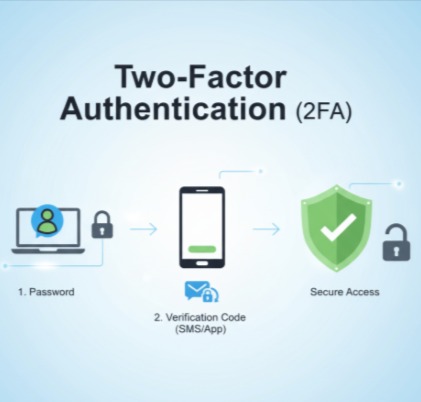
Here is how it works:
Enter your password: First, you visit a website or app and enter your username and password as usual.
Complete the second verification: After checking your password, the platform asks for another form of authentication.
Verify your identity: You enter a one-time code, approve a login notification, or use another supported verification method.
Access your account: If both verification steps are successful, you can log in.
For example, imagine logging into your email account from a new device. After entering your password, you receive a verification code through an authenticator app. Once you enter the correct code, you can access your account.
Even if someone has stolen your password, they may not be able to log in without the second verification factor.
What Are the Different Types of Authentication Factors?
Two-factor authentication works by combining two different types of identity verification. These factors generally fall into three categories.
- Something You Know
This is information that only you should know.
Examples include:
Passwords
PINs
Security questions
- Something You Have
This refers to a physical device or digital authentication method that belongs to you.
Examples include:
Mobile phones
Hardware security keys
Authentication apps
One-time verification codes
- Something You Are
This factor uses your unique physical characteristics to verify your identity.
Examples include:
Fingerprints
Facial recognition
Iris recognition
A common 2FA combination is a password and a one-time code generated by an authentication app.
Common Two-Factor Authentication Methods
There are several ways websites and applications provide additional login security.
SMS Verification Codes
A temporary code is sent to your registered mobile number. You enter this code to complete the login process. It is easy to use, but SMS codes can be vulnerable to SIM-swapping attacks and message interception.
Authenticator Apps
Apps such as Google Authenticator and Microsoft Authenticator generate temporary verification codes. These codes usually change every 30 seconds and provide a more secure option than SMS.
Push Notifications
Some services send a login approval notification to your registered device. You simply review the request and approve or reject it.
Biometric Authentication
Fingerprint scans and facial recognition can help verify your identity. They are convenient because you do not need to remember or enter another code.
Hardware Security Keys
These are physical devices that connect to your computer or phone through USB, NFC, or another supported connection. They provide strong protection against many phishing attacks.
Why Is Two-Factor Authentication Important?
Cybercriminals often try to steal passwords through phishing emails, fake websites, malware, and data breaches. If an account only uses a password, stolen login details may be enough to access it.
Two-factor authentication helps reduce this risk by adding another verification step.
Here are some important benefits:
Better account security: It makes unauthorized access more difficult.
Protection against stolen passwords: Knowing your password alone may not be enough to enter your account.
Reduced risk of identity theft: It adds protection to accounts containing personal information.
Safer online banking: It provides an additional security check for sensitive financial accounts.
Improved business security: It helps protect company emails, business applications, and important data.
Is Two-Factor Authentication Completely Secure?
Although 2FA provides stronger account protection, it is not completely foolproof.
Attackers may still find ways to bypass authentication through phishing, social engineering, SIM-swapping attacks, or malware.
For example, a cybercriminal might create a fake login page and trick someone into entering both their password and verification code.
This is why it is important to use secure authentication methods and stay alert to suspicious login requests.
Best Practices for Using Two-Factor Authentication
To get better protection from 2FA, follow these simple security practices:
Enable 2FA on important accounts, especially email, banking, and social media.
Use an authenticator app or hardware security key whenever possible.
Never share verification codes with anyone.
Avoid approving login requests that you did not initiate.
Keep your phone and authentication apps updated.
Save backup codes in a secure location.
Use strong and unique passwords for different accounts.
These small steps can make a significant difference in protecting your online identity.
Final Thoughts
Two-Factor Authentication is one of the simplest ways to improve online security. It adds an extra verification step that helps protect accounts from unauthorized access, even when passwords are exposed.
As cyber threats continue to evolve, relying only on passwords is becoming increasingly risky. Enabling 2FA, choosing secure authentication methods, and following basic cybersecurity practices can help keep your personal and professional information safer.
Online security starts with small steps, and enabling Two-Factor Authentication is one of them.
Comments
Join the discussionNo comments yet. Be the first to comment.